In the competitive world of e-commerce, providing customers with a seamless, personalized experience is key to driving sales and building loyalty. The WooCommerce Products Wizard plugin offers powerful PDF generation capabilities that can transform how you handle custom product configurations, orders, and customer communications. This article explores the profit potential and practical use cases of this feature, highlighting its flexibility and customization options.
Why PDF Generation Matters for Your Store
PDF generation isn’t just about creating digital documents—it’s about professionalism, clarity, and automation. When customers build complex products (computers, bicycles, gift boxes, or custom apparel), having a clear, shareable record of their selections reduces confusion, minimizes support tickets, and enhances trust. For merchants, automated PDFs streamline order processing and create upsell opportunities.
Let’s find out how you can improve your clients’ experience with your WooCommerce Composite Products by providing them the possibility to get a quote PDF.
Complete Administrative Control: No Coding Required
One of the standout features of the Products Wizard is that all PDF settings can be modified directly via the admin panel. You don’t need to touch a single line of code to create professional, branded documentation.
What You Can Customize:
- Header and Footer Content – Add your logo, company details, page numbers using shortcodes like
[wcpw-result-pdf-page-number]and[wcpw-result-pdf-page-total] - Main Content Areas – Top and bottom descriptions allow you to place personalized messages, terms, or promotional content
- Page Spacing – Define margins to ensure your content fits perfectly on each page
- Custom CSS – Apply your own styling rules to match brand guidelines
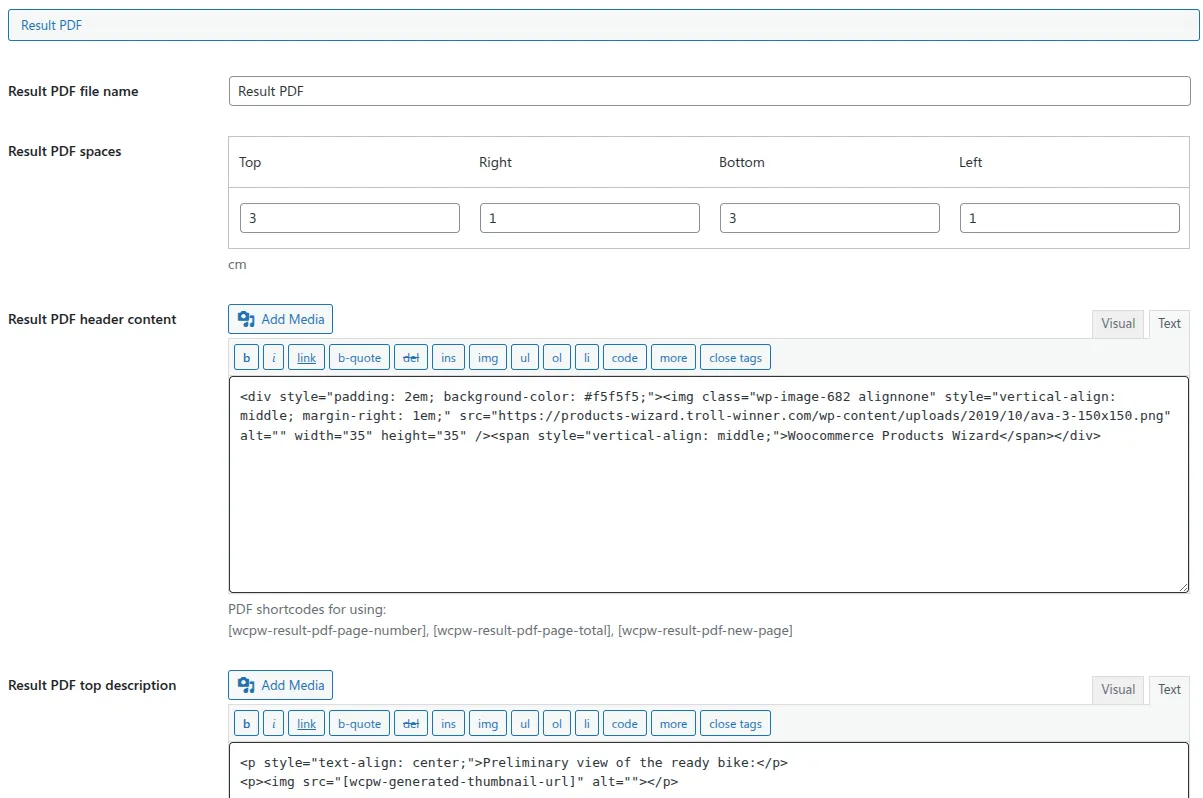
The PDF additional CSS setting provides a possibility to pass extra CSS rules into the PDF file. This means you can fully control fonts, colors, and layout without limitations.
You easily can add a special button into the wizard header and footer to download or open PDF in a new tab right from the results step of the configurator.
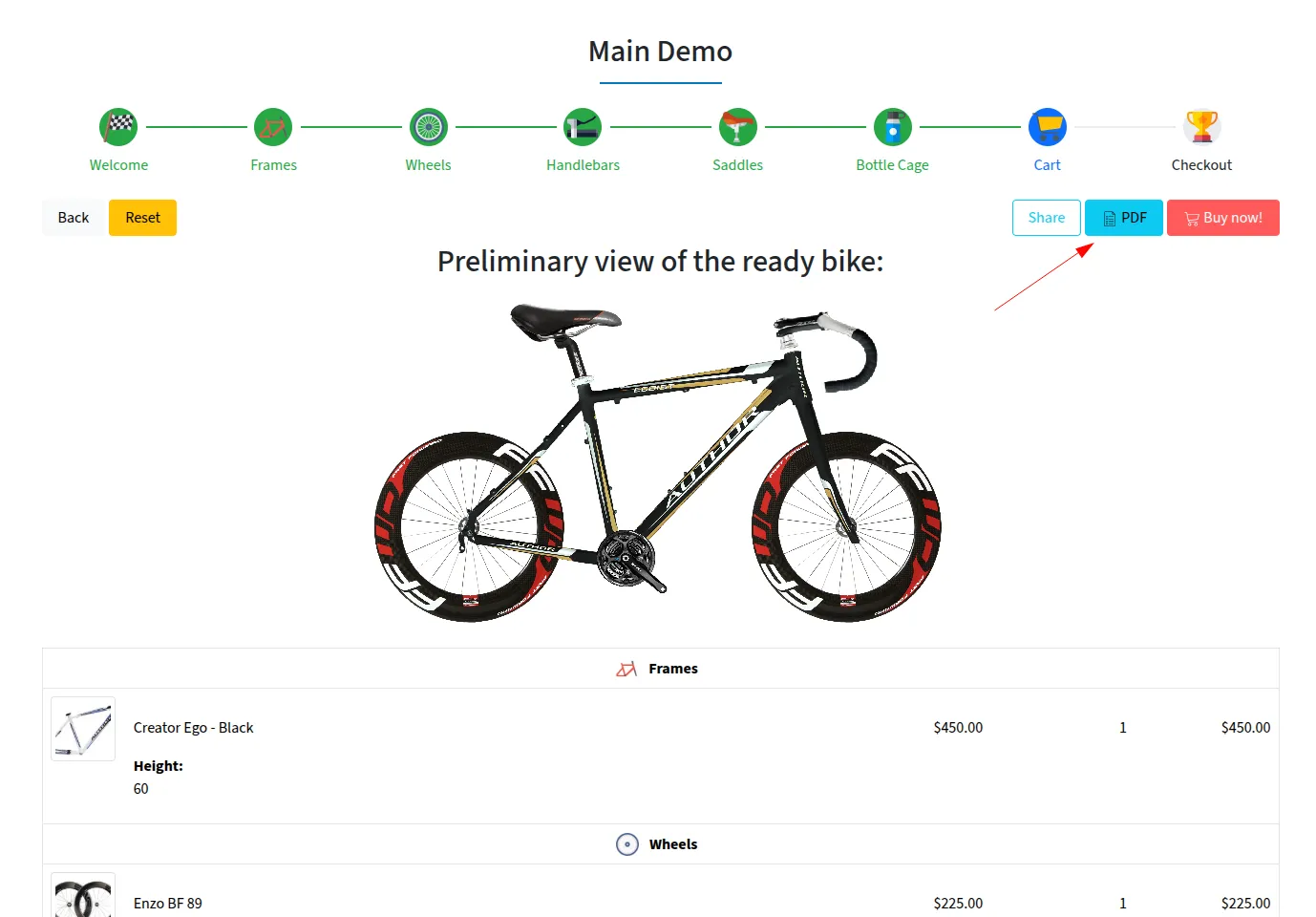
Profit Angle: Branded, professional-looking PDFs increase perceived value. A customer who receives a polished configuration summary is more likely to complete their purchase and return for future orders.
Integration with Contact Form 7: Capture Leads with Attachments
The ability to add a Contact Form 7 form to the final step is where PDF generation becomes a powerful lead generation and sales tool. Here’s how it works:
- Customer completes the product configuration wizard
- On the results step, a Contact Form 7 form is displayed
- When submitted, the email automatically includes the PDF as an attachment using the
[wcpw-result-pdf]shortcode in the “File attachments” field
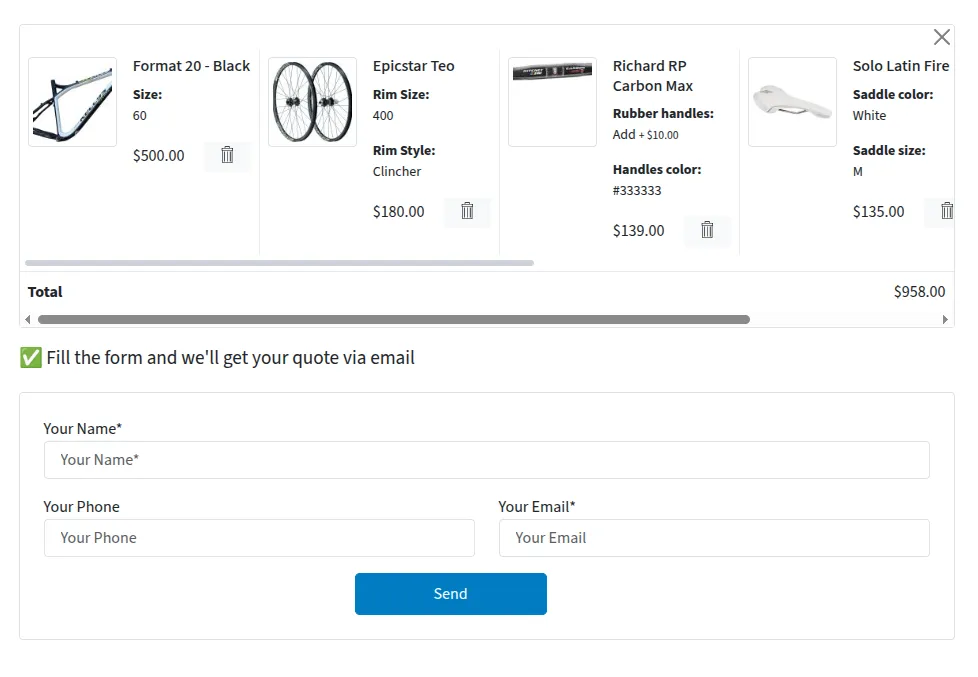
Profit-Driving Applications:
- Quote Requests – For high-ticket custom items (e.g., industrial equipment, custom furniture), customers submit their configuration for a personalized quote. Your team receives all details in a clean PDF.
- Lead Qualification – Require email capture before revealing the final price or sending the configuration. Build your mailing list while providing value.
- Internal Order Routing – Automatically send the PDF to production teams, suppliers, or project managers without manual data entry.
Attach PDF to Root Product: Streamline Order Management
For stores using the kit grouping feature, you can attach the generated PDF directly to the root product of the order kit. This is a game-changer for:
- Fulfillment Teams – Warehouse staff open the order and immediately see the exact configuration PDF attached to the main product
- Custom Manufacturing – Production teams receive spec sheets without logging into separate systems
- Customer Service – Support agents access the original configuration instantly, reducing resolution time
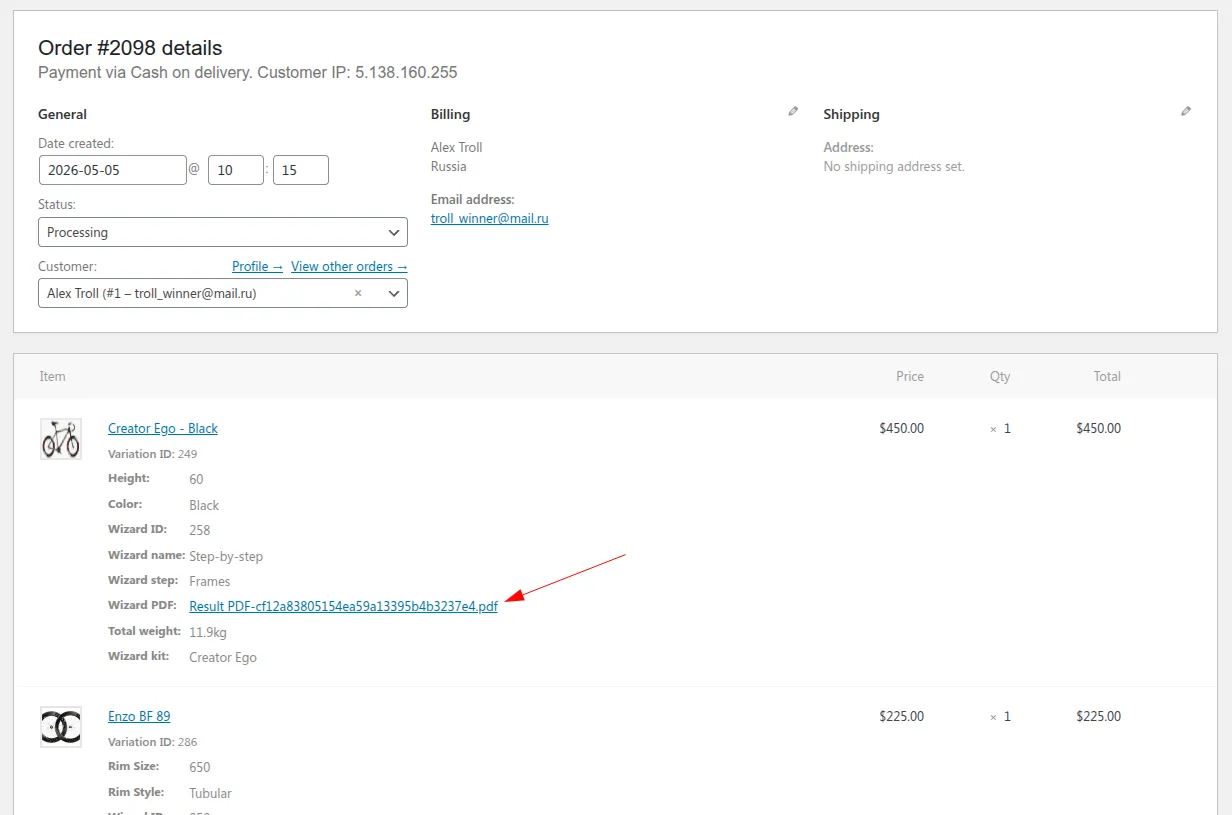
To have this feature just enable “Attach PDF to the root product” in the PDF Settings section, and the file becomes part of the order data.
Profit Angle: Reduced operational friction means lower labor costs per order. When you scale to hundreds of custom orders monthly, this automation saves hours of manual work.
Shareable Links: Reopen Configurations with One Click
A truly innovative feature is the ability to add a share link inside the PDF that reopens the configurator with all selected items and products. This creates a seamless customer journey:
- Customer builds a product configuration
- Receives PDF via email
- Clicks the link in the PDF
- Returns to the exact configuration (all selections preserved)
- Modifies, adds items, or completes checkout
The plugin achieves this through the “Save state to URL” setting, which can generate either short database-stored links or query-based URLs. Use [wcpw-db-url-url] shortcode inside your PDF templates. This shortcode creates a new record in the database to store the wizard state as URL and returns short URL alias.
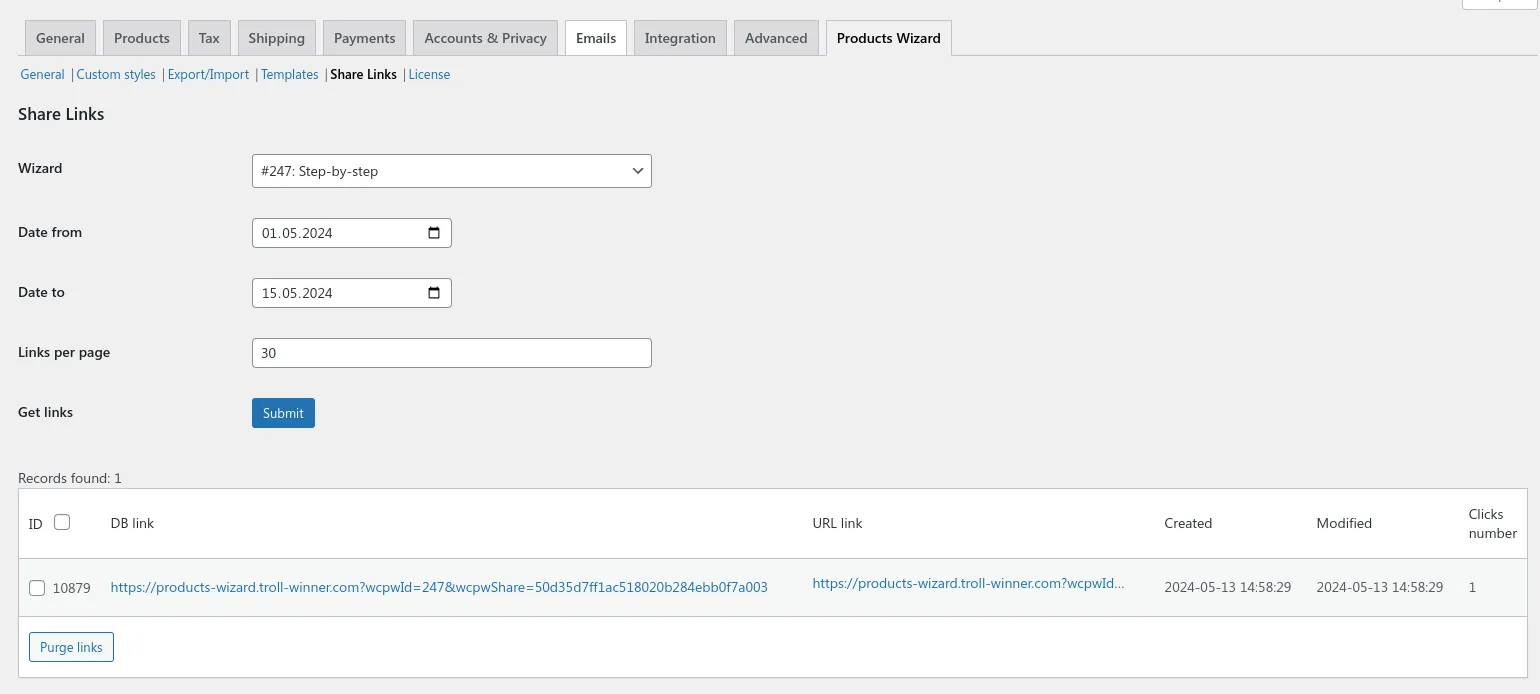
Use Cases with High ROI:
- Collaborative Buying – A corporate client shares the link with their procurement team for approval
- Abandoned Cart Recovery – Send the PDF with a link and a limited-time discount code
- Sales Team Tool – Representatives pre-configure optimal setups and share links with prospects
Profit Angle: Reducing friction from consideration to purchase directly impacts conversion rates. Each click that doesn’t require rebuilding the configuration is a saved sale.
Developer-Friendly: Easy Source Code Modification
While the admin interface covers 95% of use cases, the plugin respects that sometimes you need full control over the code. If you wish to modify the default PDF template make a copy of views/result-pdf folder to your active theme (or child theme) directory to woocommerce-products-wizard/result-pdf. This is possible to do right via the plugin settings page if needed.
The template override system means:
- Your changes survive plugin updates
- You can modify any PHP, HTML, or CSS
- Add custom shortcodes or dynamic data sources
- Implement advanced conditional logic
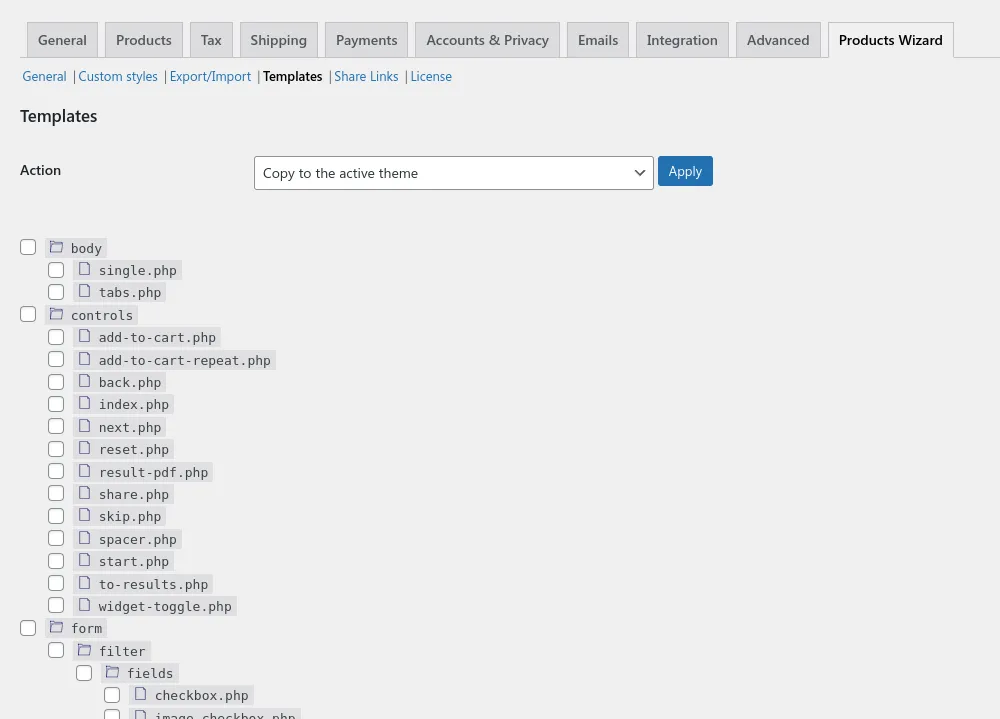
For developers, this is crucial. Need to add a barcode, integrate with a third-party API, or pull data from custom fields? You have direct access to the source.
Real-World Profit Scenarios
Case 1: Custom Bicycle Builder
A bike shop implements the wizard with PDF generation. Customers select frame, wheels, groupset, and accessories. The PDF includes a share link and attaches to the order. Result: 32% increase in average order value (customers add more components when they see the professional summary) and 50% reduction in post-purchase clarification emails.
Case 2: Event Planning Kit
A party supply store creates “event in a box” wizards. Each step adds decorations, tableware, and favors. The Contact Form 7 integration captures event date and delivery address. PDF attached to the root product goes to the warehouse. Profit margin increases because bundled items reduce per-unit shipping costs.
Case 3: B2B Custom Packaging
A packaging manufacturer uses the wizard for quote generation. Customers build boxes with dimensions, materials, printing options. PDF with share link allows internal approval workflows. Each PDF saves 20 minutes of sales rep time per quote. With 50 quotes daily, that’s over 16 hours saved per day.
Getting Started
Configure your PDF settings under Wizard Settings → PDF Settings in your Products Wizard admin panel. Experiment with the built-in shortcodes before adding custom CSS or template modifications. The documentation provides comprehensive examples.
Final Thoughts
The PDF generation capabilities of WooCommerce Products Wizard aren’t just an add-on—they’re a strategic tool for profitability. From reducing support overhead to increasing order values through professional presentation, the ROI is clear. The combination of admin-configurable settings, Contact Form 7 integration, root product attachments, shareable links, and developer-friendly code access makes this solution suitable for stores of any size.
Whether you sell computers, custom gifts, industrial components, or anything in between, implementing PDF generation with WooCommerce Products Wizard will streamline operations and delight customers—directly impacting your bottom line.